

Why iOS 27 Drains Battery and How to Fix It
 Jerry Cook
- Updated on 2026-08-31 to iOS 27
 Jerry Cook
Many iPhone users install beta updates to test new features before the public release. While beta versions can be exciting, they often come with problems. One of the most common issues users report is iOS 27 battery drain. After updating, some users notice their iPhone battery dropping faster than usual, heating up during normal use, or losing charge overnight. This guide explains why ios 27 beta draining battery problems happen, how to check what causes the issue, and the best ways to improve ios 27 beta battery life without losing data.
- Part 1. Is iOS 27 Battery Drain Normal?
- Part 2. Why Does iOS 27 Drain Battery So Fast?
- Part 3. Check What Is Draining Battery on iOS 27
- Part 4. Fix iOS 27 Battery Drain Without Data Loss [Recommended]
- Part 5. More Ways to Improve iOS 27 Battery Life
- Method 1. Wait for iOS Background Tasks to Finish
- Method 2. Restart Your iPhone
- Method 3. Update All Apps
- Method 4. Turn Off Background App Refresh
- Method 5. Limit Location Services
- Method 6. Enable Low Power Mode
- Method 7. Use Wi-Fi and Avoid Weak Signal Areas
- Method 8. Wait for the Next iOS 27 Update
- Part 6. When Should You Downgrade from iOS 27?
- Part 7. FAQs About iOS 27 Battery Drain
Part 1. Is iOS 27 Battery Drain Normal?
Yes, some battery drain is normal after installing a beta update. Your iPhone may need time to complete system tasks in the background. During this process, you may notice your battery percentage dropping faster. However, extreme battery loss is not normal. If your battery drains heavily for several days, there may be a software issue, app problem, or battery health issue.
Normal vs. Abnormal Battery Drain
| Situation | Normal Battery Drain | Abnormal Battery Drain |
|---|---|---|
| First 24-48 hours after update | Yes | No |
| Phone feels slightly warm | Yes | No |
| Battery drops 5-10% overnight | Yes | No |
| Battery drops 20-30% overnight | No | Yes |
| iPhone overheats during simple tasks | No | Yes |
| Battery drains within a few hours | No | Yes |
| Drain continues after several days | No | Yes |
If you are asking, does ios 27 beta drain battery, the answer is yes for many users during the first days after updating. Still, serious drain usually needs troubleshooting.
Part 2. Why Does iOS 27 Drain Battery So Fast?
There are several reasons behind ios beta battery drain issues after installing a beta version.
Post-Update Background Tasks
After updating, iOS performs many hidden tasks such as:
-
Reindexing photos
-
Syncing iCloud data
-
Updating apps
-
Organizing system files
-
Optimizing battery settings
These tasks use CPU power and battery in the background. This is one of the biggest reasons for iOS 27 battery drain during the first few days.
Beta Software Bugs
Beta software is not fully stable. Apple releases beta updates mainly for testing. Bugs inside the system may cause:
-
Excessive background activity
-
High CPU usage
-
Random overheating
-
Fast battery drain
This is why many users experience ios 27 beta draining battery problems after installing developer or public beta updates.
App Compatibility Issues
Some apps are not fully optimized for beta software. Older apps may keep crashing or running in the background.
Common examples include:
-
Social media apps
-
GPS apps
-
Video streaming apps
-
Gaming apps
These apps may reduce ios 27 beta battery life until developers release updates.
Location, 5G, and Poor Signal
Weak cellular signals can make your iPhone work harder to maintain a connection. This causes more battery use.
Battery drain may increase if you:
-
Use 5G constantly
-
Stay in weak signal areas
-
Keep GPS enabled all day
-
Use navigation apps for long periods
Many users reporting ios 27 beta beta battery drain notice improvements after limiting location services and switching to Wi-Fi.
Low Battery Health or Overheating
Older batteries naturally lose capacity over time. If your battery health is below 80%, beta software may increase battery problems. Overheating can also worsen ios 27 beta battery drain fix attempts because heat reduces battery efficiency.
Signs include:
-
Slow charging
-
Warm device during charging
-
Lagging performance
-
Battery percentage dropping suddenly
Part 3. Check What Is Draining Battery on iOS 27
Before trying any fix, you should first find out what is causing the battery problem. Many users facing iOS 27 battery drain notice that certain apps, background tasks, overheating, or battery health issues are responsible. These checks can help you identify the exact reason behind fast battery loss.
Check Battery Usage by App
Some apps consume more power than others, especially after a beta update. Social media, gaming, streaming, and navigation apps often run background activities that increase ios 27 beta draining battery problems. Checking battery usage helps you identify which apps are draining power the fastest.
To check app battery usage:
step 1: Open Settings
step 2: Tap Battery
step 3: Scroll down to see battery usage by app
Look for apps showing unusually high battery usage or heavy background activity. Updating or limiting these apps can improve ios 27 beta battery life.

check battery usage by app
Check Battery Health
Battery health plays a major role in overall battery performance. If your battery capacity is already low, beta software may increase battery drain even more. Older batteries often struggle to handle background tasks and new iOS features efficiently.
To check battery health:
step 1: Open Settings
step 2: Tap Battery
step 3: Select Battery Health & Charging
If Maximum Capacity is below 80%, your battery may contribute to ios beta battery drain and reduced performance.
check battery health
Check Standby Drain
Standby drain happens when your iPhone loses battery while not being used. A small battery drop overnight is normal, but large battery loss may indicate background system issues or app activity causing ios 27 beta battery drain.
Normal standby drain is usually:
- Around 2% to 5% overnight
Abnormal standby drain may include: - Losing 15% to 30% overnight
-
Battery dropping even in airplane mode
Heavy standby drain often appears after beta updates because iOS performs syncing and indexing tasks in the background.
Check Overheating or Slow Charging
Overheating is another common sign of ios 27 beta draining battery problems. If your iPhone becomes hot during simple tasks like browsing or charging, some apps or system processes may be using excessive power.
You should also check for:
-
Slow charging speed
-
Battery percentage jumping suddenly
-
Device lagging during use
-
Warm temperature while idle
These signs usually indicate that background processes or software bugs are affecting ios 27 beta battery life.
Part 4. Fix iOS 27 Battery Drain Without Data Loss [Recommended]
If basic methods do not solve the problem, repairing the iOS system may help fix deeper software issues causing iOS 27 battery drain. Many users experience battery problems because of corrupted system files, failed updates, or unstable beta software. Instead of resetting your iPhone and losing important data, you can use UltFone iOS System Repair to repair the system safely. The tool helps fix battery drain, overheating, stuck screens, and many other iOS problems while keeping your photos, messages, and apps secure. It also supports the latest iOS versions and offers simple repair steps for beginners.
Key Features of UltFone iOS System Repair
-
No Data Loss Repair: Repairs system issues without deleting your photos, messages, apps, videos, or personal files like factory reset methods.
-
One-Click iOS Downgrade: Easily downgrade from iOS 27 beta to a stable iOS version if the beta update keeps causing battery drain.
-
Fixes 150+ iOS Problems: Solves issues like black screen, frozen iPhone, boot loops, Apple logo stuck, overheating, and charging problems.
-
Supports Latest iOS Versions: Works smoothly with newer iOS updates and supports many iPhone and iPad models without compatibility problems.
-
Simple and Beginner-Friendly Tool: The repair process is easy to follow, making it useful even for users with no technical experience.
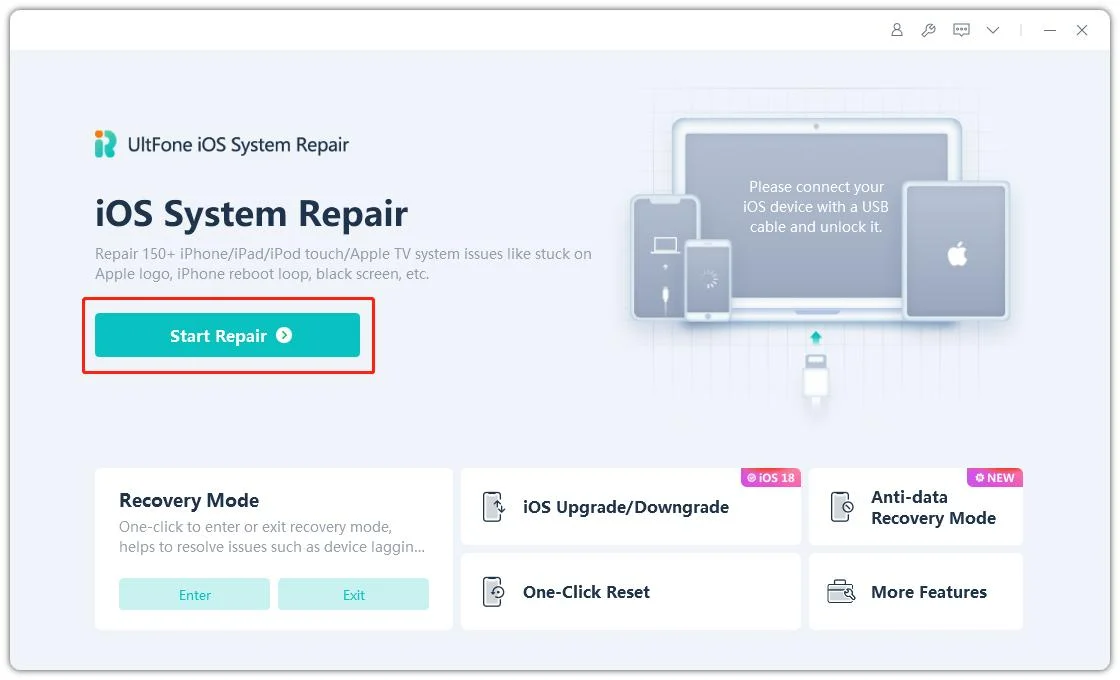
- Step 1 Download and launch UltFone iOS System Repair on your PC/Mac, connect your iPhone/iPad/iPod touch with the original USB cable, click "Start" to enter the repair module, then select "Standard Repair." (Standard Repair fixes iOS issues without any data loss. If your device isn't detected, the program will guide you to enter recovery mode or DFU mode manually.)
- Step 2 Click "Download" to get the firmware package automatically matched to your device (about 2.5 GB, so keep your internet connection stable). If you've already downloaded it before, click "import local firmware" to import it locally.
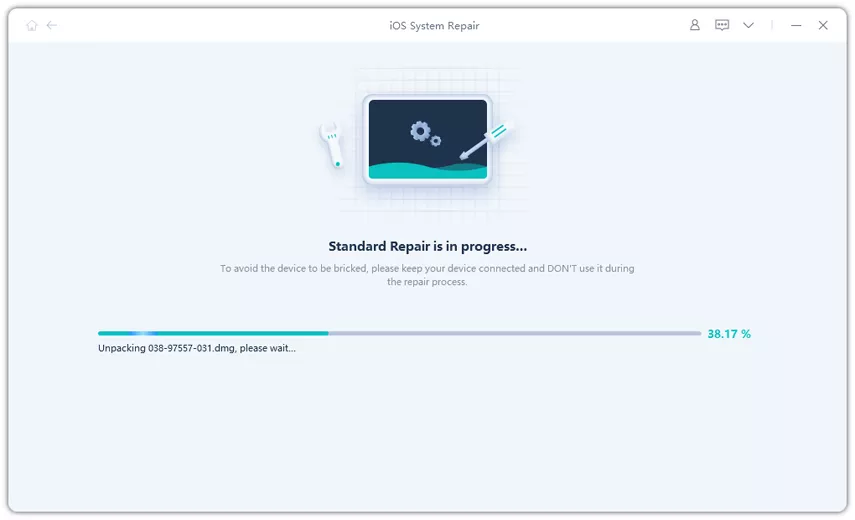
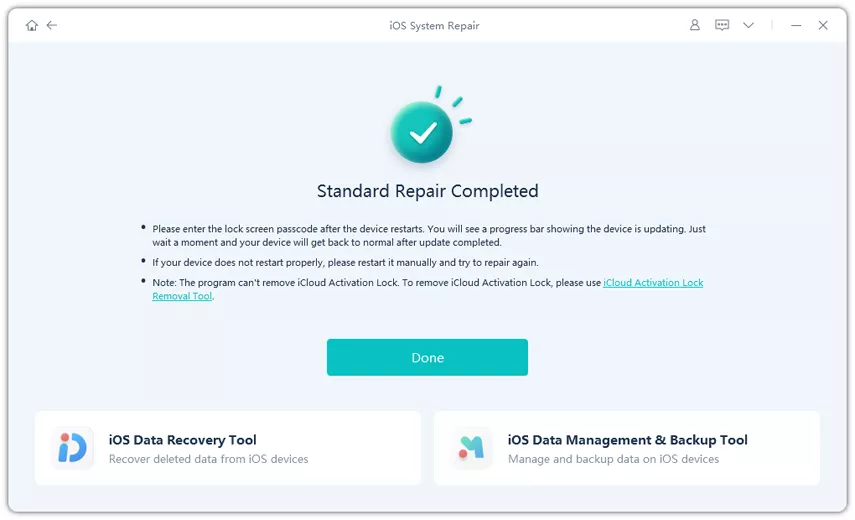
- Step 3 Once the firmware download is complete, click "Start Standard Repair" and wait a few minutes. When it's done, your device will reboot automatically and return to normal.

Part 5. More Ways to Improve iOS 27 Battery Life
If the issue continues, try these methods.
Method 1. Wait for iOS Background Tasks to Finish
After updating, give your iPhone at least 24-48 hours. Background indexing and syncing often cause temporary ios beta battery drain. Keep your iPhone connected to Wi-Fi and charging overnight if possible.
Method 2. Restart Your iPhone
A simple restart can stop stuck processes causing ios 27 beta battery drain.
How to Use:
step 1: Press and hold the power button
step 2: Slide to power off
step 3: Wait 30 seconds
step 4: Turn the phone back on
restart your iphone
Method 3. Update All Apps
Outdated apps may not work properly with beta software.
How to Use:
step 1: Open the App Store
step 2: Tap your profile icon
step 3: Update all apps
This can help reduce ios 27 beta beta battery drain problems.
update all apps
Method 4. Turn Off Background App Refresh
Background App Refresh lets apps update in the background continuously.
How to Use:
step 1: Open Settings
step 2: Tap General
step 3: Tap Background App Refresh
step 4: Turn it off
This often improves ios 27 beta battery life immediately.
turn off background app refresh
Method 5. Limit Location Services
GPS services consume a lot of battery.
How to Use:
step 1: Open Settings
step 2: Tap Privacy & Security
step 3: Tap Location Services
Set unnecessary apps to:
-
Never
-
While Using the App
This can reduce ios 27 beta draining battery issues significantly.
- imit location services
Method 6. Enable Low Power Mode
Low Power Mode reduces background activity and visual effects.
How to Use:
step 1: Open Settings
step 2: Tap Battery
step 3: Enable Low Power Mode
This is one of the fastest temporary solutions for ios 27 beta battery drain fix.
enable low power mode
Method 7. Use Wi-Fi and Avoid Weak Signal Areas
Weak mobile signals increase battery usage. To improve battery life:
-
Use Wi-Fi whenever possible
-
Avoid poor signal areas
-
Disable 5G if unnecessary
Many users asking does ios 27 beta drain battery notice better results after reducing cellular usage.
Method 8. Wait for the Next iOS 27 Update
Apple usually fixes battery problems in later beta releases. If your battery drain started after a specific beta version, the next update may improve ios beta battery drain automatically.
Part 6. When Should You Downgrade from iOS 27?
Sometimes downgrading is the best option.
You should consider downgrading if:
-
Battery drains extremely fast
-
iPhone overheats constantly
-
Apps crash frequently
-
The phone becomes unusable
-
Battery problems continue for over a week
Using UltFone iOS System Repair makes downgrading easier without complicated steps. If ios 27 beta draining battery badly affects daily use, moving back to a stable iOS version may be the best solution.
Part 7. FAQs About iOS 27 Battery Drain
1. What iOS 27 background tasks cause increased battery drain?
After updating, iOS performs indexing, iCloud syncing, app optimization, and photo analysis in the background. These tasks can temporarily increase CPU usage and battery consumption. This is one of the biggest causes of iOS 27 battery drain during the first 48 hours.
2. Explain how to use Low Power Mode to mitigate battery drain
Low Power Mode reduces background app activity, visual effects, mail fetching, and automatic downloads. Go to Settings > Battery > Low Power Mode and turn it on. This feature helps improve ios 27 beta battery life when your battery drains too quickly.
3. What steps should I take to troubleshoot battery drain after updating my iPhone?
You should check battery usage, update apps, restart the iPhone, disable Background App Refresh, limit location services, and monitor overheating. If the issue continues, use a repair tool like UltFone iOS System Repair for an effective ios 27 beta battery drain fix.
4. How can I identify apps consuming excessive battery in iOS 27?
Open Settings > Battery and review battery usage statistics. Apps showing high screen activity or background activity may be responsible for ios beta battery drain. Updating or removing problematic apps may help improve battery performance.
5. How do I stop iOS 27 from draining my battery?
To stop excessive drain, keep apps updated, reduce background activity, use Low Power Mode, avoid weak signal areas, and repair system issues if needed. Many users improve ios 27 beta draining battery problems by combining these methods.
Conclusion
Experiencing iOS 27 battery drain after updating your iPhone is common, especially during the first few days. In many cases, background tasks and beta bugs are responsible for the issue. However, if the battery keeps draining heavily, you should take action quickly. This guide covered the most effective ways to improve ios 27 beta battery life, including checking battery usage, limiting background activity, updating apps, and using Low Power Mode. If regular fixes do not work, UltFone iOS System Repair is a reliable option for repairing system problems and even downgrading from beta versions without data loss.
- 1-click to fix iPhone/iPad stuck in recovery mode for free
- Repair 150+ iOS 27/26/18 update problems without data loss
- Fix iOS 27/26 downgrade stuck problems
- Downgrade iOS 27/26 without losing data
- Fix 100+ iOS update/restore error
